Free Claude Code pluginMITChecks run offline
Check your Claude Code agent team in one command.
Crafthall HQ reads your subagents (.claude/agents/), skills and CLAUDE.md and lists what to fix first – broken file references, missing fields, conflicting instructions, one-way handoffs – each with the file and line.
claude plugin install crafthall-hq --marketplace crafthall/pluginsThen open Claude Code in your project and run /crafthall-hq:open. Needs Claude Code 2.1.292+.
Older Claude Code? Use two commands
claude plugin marketplace add crafthall/pluginsclaude plugin install crafthall-hq@crafthall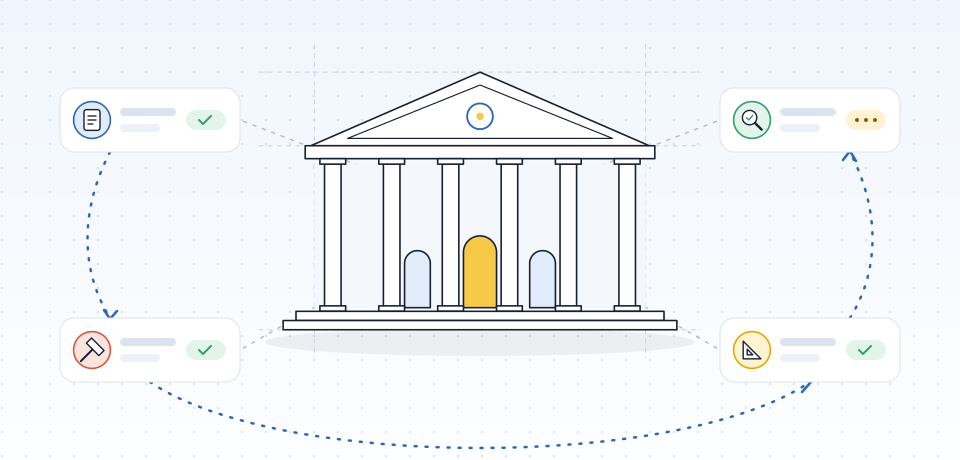
- checks
- 15
- sent to us – checks run locally
- 0 bytes
- every run
- Same result
- licensed
- MIT
Every subagent has a craft. Does your team know who does what?
A Claude Code project grows one agent and one skill at a time. After a while nobody can say which agent owns what, who hands work to whom, or which instructions contradict each other.
A village works because every craftsman knows their trade and where the work goes next. Crafthall HQ gives your AI team the same picture.
| In a workshop | In your project |
|---|---|
| Craftspeople | Agents |
| Trades and tools | Skills and tools |
| Who does what | Agent definitions |
| House rules | CLAUDE.md and workflows |
| Passing the work on | Handoffs |
Lint your Claude Code subagents in three steps
Install
One command. No account, no config.
Run /crafthall-hq:open
Crafthall HQ reads .claude/agents/, your skills and CLAUDE.md on your machine and opens a dashboard in your browser.
Read the verdict
The dashboard shows the verdict, a health score with its working, and the top hints with file and line. Add --report to get the same in the chat.
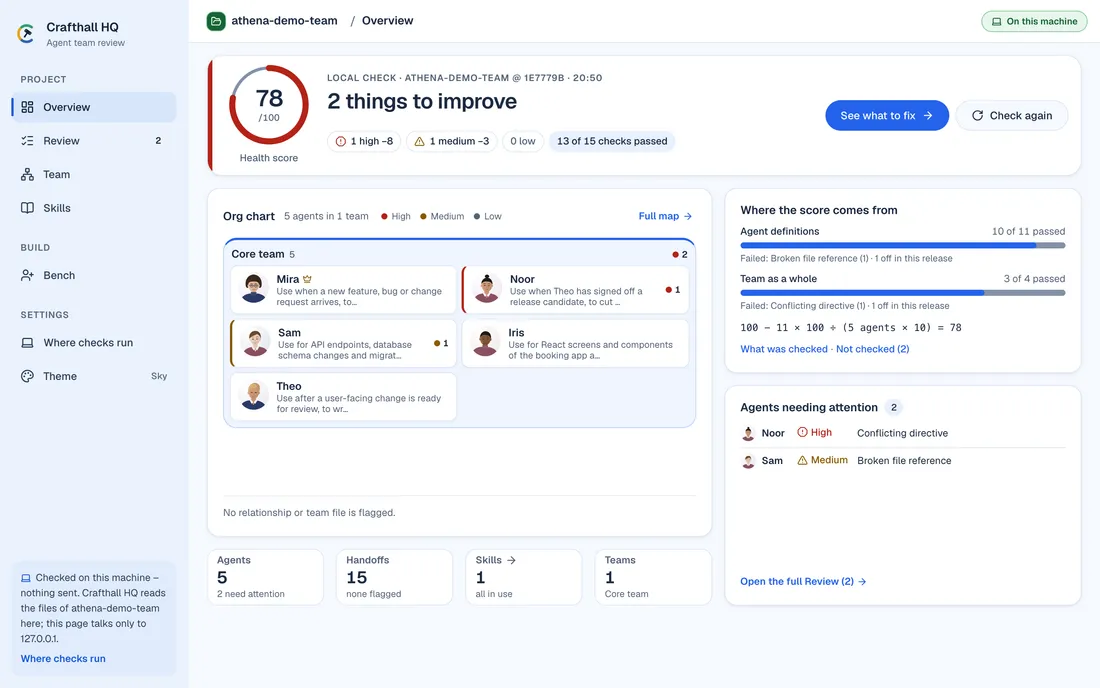
What one check of your Claude Code agent team gives you
A verdict first
One line: OK, or N things to improve, most important first. A health score you can recompute: every point traces to a hint.
Your team as an org chart
Agents, teams and who hands work to whom, with a hint count on every agent.
Agent profiles with evidence
Each agent's role, skills and hints, with the source file and line.
Every skill in one list
All the skills in the project, including shared and unassigned ones.
2 things to improve (checked on this machine, nothing sent)

Issues: 2 things to improve · shown below: all 2
 1. [high] Conflicting directive – .claude/agents/release-manager.md:14
    Noor is told to "Push every urgent production fix directly to main and deploy it the same hour.", while CLAUDE.md says "Never push directly to main". An agent following its own file breaks the other's rule.
    Fix: Decide which rule holds, fix the outlier file, and keep the rule in one place that agent files link to.
 2. [medium] Broken file reference – .claude/agents/backend-developer.md:11
    Sam is pointed to `docs/api/conventions.md`, which does not exist in the repo.
    Fix: Fix the path or remove the reference; an agent that cannot find its instructions improvises.
What it checks in your subagents, skills and CLAUDE.md
15 checks run on every call, on your machine. Text patterns, not a model: the same files give the same result. Each check has its own page with a real example and the fix.
Each agent and skill file7
- Missing definition fieldAn agent file lacks name or description (required by Claude Code), or lacks a persona or tool limit that the rest of the team sets.
- Duplicate agent id or nameTwo agents share an id or a personal name, so delegation is ambiguous.
- Broken file referenceAn agent or skill points to a repo path that does not exist.
- Wrong name for an agentA file calls an agent by a personal name different from its `persona:`.
- Tools do not match the jobThe agent is told to write files but has no Write or Edit tool.
- Broken frontmatterThe frontmatter block of an agent file is not closed, or has a line that is not valid YAML, so Claude Code reads no fields from it.
- Unknown tool in the tool listA `tools:` entry is not a Claude Code tool name and not an MCP tool; a near-miss of a known name is a typo.
The team as a whole8
- Conflicting directiveTwo files give opposite instructions on the same policy.
- Cross-team boundary unclearFiles disagree on which agents one team may borrow from another, and for what.
- One-way handoffAn agent hands work to another agent whose file never mentions it, so the receiver has no contract for that input.
- Nobody delegates to this agentNo other agent, skill or team document names the agent.
- No boundaries definedThe agent file never says what the agent must not do.
- Code changes are never verifiedAn agent that writes code names no test, check or review step and hands its work to no agent that tests or reviews it.
- Retry loop without a limitAn agent is told to keep trying until checks pass, with no limit on rounds and no point where it hands back or escalates.
- Failing tests may be skipped or retriedA file allows skipping, disabling, retrying or sleeping around failing tests instead of fixing the cause.
Off by default (too many false alarms in our tests): unclear when to use the agent, overlapping responsibilities.
How handoffs between subagents are read, like work passing through the village
Crafthall HQ reads handoffs from how your files describe them. It does not run your agents.
Example team, drawn for this page.
See your subagents in a local dashboard
/crafthall-hq:open opens the full picture: the dashboard, every hint with its fix, and a map of who hands work to whom – in your browser, served from your machine.

- Each agent from .claude/agents/, with the number of hints on it
- Who hands work to whom, read from the agent files
- Relationship types you can switch on and off
Checks run on your machine. Nothing is sent to us.
- Reads only your agent files, skills and CLAUDE.md
- No account, no telemetry, no analytics
- The dashboard is served from 127.0.0.1
- The assistant review is on by default: Claude reads the same agent files in your own Claude Code session, so that content goes to Anthropic under the terms you already use Claude Code with. Skip it with --no-assistant.
What Crafthall HQ does not do
- It does not run or orchestrate your agents
- It does not judge whether your team gets good results – it checks how the team is written
- Crafthall HQ changes your files only after you see the diff and confirm. It edits only the persona: frontmatter key and, only if you tick it, the "Your name is" line. Every other fix is shown, not applied
- It checks Claude Code teams only (.claude/agents/, skills, CLAUDE.md)
Built for today's team. Planned for the whole village.
Crafthall HQ's mission is to help people understand, organize and continuously improve the way their AI teams work. Release 1 covers seeing and checking the team. Next directions we are exploring: suggesting missing roles, assessing skills, and support beyond Claude Code. What ships next depends on how release 1 is used.
FAQ
Is it a linter for Claude Code subagents?
Yes, for files and structure. Crafthall HQ checks your subagents (.claude/agents/), skills and CLAUDE.md with deterministic text patterns: missing or broken fields, broken file references, conflicting instructions, one-way handoffs. It does not judge whether your team gets good results.
Does it send my code anywhere?
Not to us. Every check runs on your machine and Crafthall HQ itself sends nothing: no account, no telemetry, no analytics. The dashboard is served from 127.0.0.1. The assistant review, on by default, is Claude reading the same agent files in your own Claude Code session, so that content goes to Anthropic under the terms you already use Claude Code with, like any file you ask it to read; skip it with --no-assistant.
Which Claude Code version do I need?
Claude Code 2.1.292 or newer for the one-command install (check with claude --version); 2.1.275 or newer to install from inside a session with /plugin install crafthall-hq --marketplace crafthall/plugins. Older versions use two commands: claude plugin marketplace add crafthall/plugins then claude plugin install crafthall-hq@crafthall.
Does it use an LLM?
The checks do not: they are text patterns, so the same files give the same result every run. Only the assistant review uses a model – on by default, in your own Claude Code session, under the terms and plan you already use it with; --no-assistant skips it.
Is it free?
Yes. Crafthall HQ is free and MIT licensed. There is no paid tier and no sign-up.
How do I remove it?
Run claude plugin uninstall crafthall-hq@crafthall. Claude Code plugins are managed with the claude plugin command; see the Claude Code plugin docs for how plugins work. Claude Code plugin docs
Open the hall. Lint your Claude Code team.
One command, then /crafthall-hq:open in Claude Code. Free, checks run offline, no account.
claude plugin install crafthall-hq --marketplace crafthall/plugins